
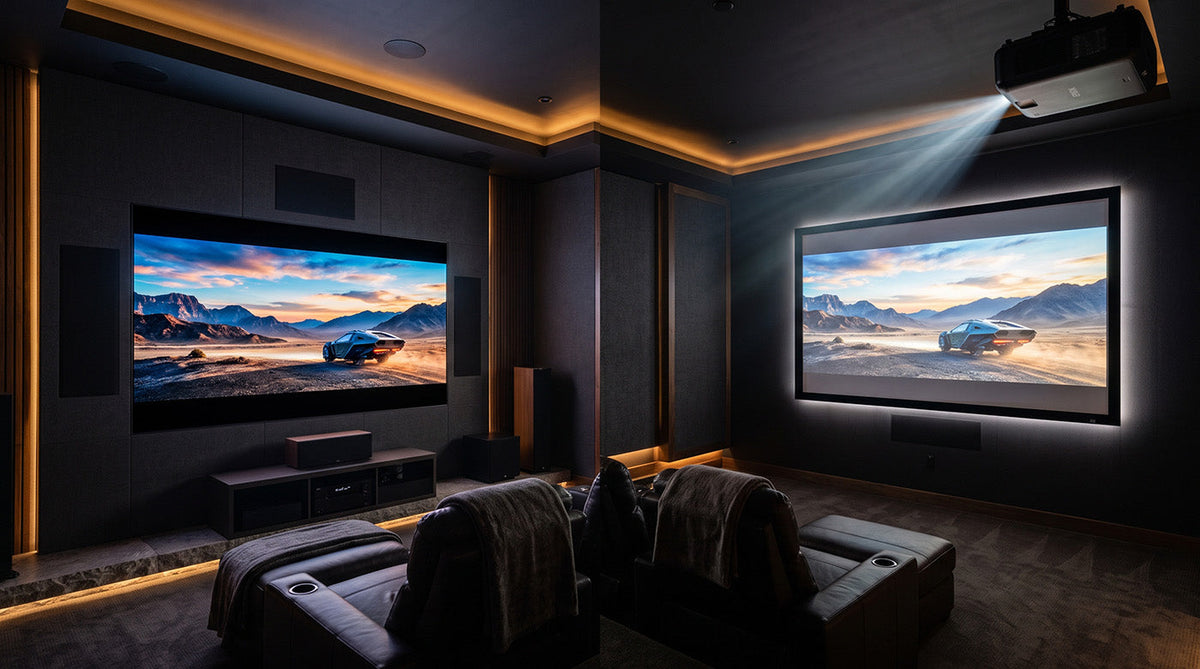
Choosing between a MicroLED display and a projector for a large-format home theater is a high-stakes decision that involves tens of thousands of dollars, a permanent room build-out, and years of daily use, so getting it wrong is expensive to undo. This guide walks ultra-high-net-worth buyers, dedicated home cinema enthusiasts, luxury commercial buyers, and early technology adopters through a six-factor decision framework covering ambient light, screen size, contrast, total cost of ownership, longevity, and use case, so you can match the right technology to your specific room before you spend a dollar. You should already know your room's dimensions, its lighting conditions, and a rough budget ceiling before you start. AWALL builds and sells both technologies under one roof, its C-Series MicroLED display and its new XWALL TITAN Noir Ultra projector line, so every comparison in this guide is grounded in real, published specifications rather than a hypothetical matchup.12
Prerequisites
- Your room's width, depth, ceiling height, and primary seating distance
- An honest read on your room's ambient light: window exposure, blackout capability, and whether the space is single-purpose or multi-use
- A rough budget ceiling for hardware, screen (if applicable), and installation
- Your primary use case: dedicated movie viewing, sports and gaming, or a mixed-use commercial or hospitality space
At a Glance: The Six-Factor Decision Framework
| Step | Phase Name | Key Action | Estimated Time/Complexity |
|---|---|---|---|
| 1 | Ambient Light Assessment | Categorize your room as dark-room, controlled multi-use, or high-ambient-light | Low, 15 to 30 minutes |
| 2 | Size and Aspect Ratio | Measure your room and match it to throw distance or wall footprint | Low, 30 to 60 minutes |
| 3 | Contrast and HDR Comparison | Compare native contrast and HDR support between technologies | Moderate, requires spec review |
| 4 | Total Cost of Ownership | Add hardware, screen, installation, and maintenance costs together | Moderate, 1 to 2 hours |
| 5 | Longevity and Reliability | Weigh burn-in risk, light-source life, and warranty coverage | Low |
| 6 | Use Case Match | Combine Steps 1 through 5 into one room-specific recommendation | Low |
This six-factor framework works because it separates the variables that actually determine technology fit, ambient light, size, image quality, cost, reliability, and use case, from marketing claims that don't hold up room to room. Working through the steps in order prevents two common and costly mistakes: buying a projector for a room with too much ambient light, and buying a MicroLED display for a use case where projection's lower upfront hardware cost and larger practical size range would have served the buyer better.3 4 Each step builds on the one before it, so a reader who completes all six arrives at a room-specific answer instead of a generic industry opinion.
Step 1: Evaluate Your Room's Ambient Light and Viewing Environment
Your room's ambient light level is the single biggest factor in whether a projector or a MicroLED display will look right.
- Walk your room at the times of day you'll actually use it, and note direct sunlight, uncovered windows, and any fixed ambient lighting.
- Classify your room as a dedicated dark-room cinema, a controlled but multi-use media room, or a bright, daytime space such as a great room or retail floor.
- MicroLED displays are built for bright and mixed-light rooms because they are direct-view, self-emissive panels. Projectors perform best when ambient light is controlled, since stray light directly reduces perceived contrast.3
Common mistake: assuming a projector will perform the same in a media room with large windows as it did in a dark, controlled showroom demo.
Pro tip: if your room can't reach near-total blackout during the hours you plan to watch, weight your decision toward MicroLED.
Step 2: Define Your Required Screen Size and Aspect Ratio
Match your target screen size and aspect ratio to what each technology can actually deliver in your room's footprint.
- Measure your room's width, depth, and ceiling height, along with your primary seating distance.
- Decide whether you need standard 16:9 or a cinema-style widescreen. AWALL's C-Series supports 16:9 and 21:9 CinemaScope,1 while the XWALL TITAN Noir Ultra supports 16:9 and 2.35:1 CinemaScope.2
- Check your target size against a projector's throw-distance requirements or a MicroLED panel's available sizes before committing to a number.
Common mistake: AWALL's screens ship in fixed sizes of 100 inches, 120 inches, and 150 inches,5 which do not line up exactly with the C-Series' preconfigured sizes of 102 inches through 162 inches.1 If you're comparing a 135-inch C-Series panel to a projector setup, you need the 150-inch screen tier, not a straight size match.
Pro tip: confirm your ceiling height and mounting point support your target throw ratio before you settle on a specific screen size.
Step 3: Compare Contrast, Black Level, and HDR Performance
Compare native contrast, not marketing contrast, to understand how each technology actually handles black levels and HDR highlights.
- Native contrast measures a display's real, unassisted black level. Dynamic or iris-assisted contrast numbers typically run much higher than native contrast and don't reflect real-world performance the same way.3
- MicroLED panels produce true black at the pixel level because each LED is self-emissive and simply turns off; there's no backlight to leak light into dark scenes.3
- Premium laser projectors, including AWALL's own XWALL TITAN Noir Ultra, use iris systems and light-source management to push dynamic contrast well beyond native contrast.2
Common mistake: comparing one technology's dynamic or marketing contrast figure against another technology's native contrast figure. Always compare like for like.
MicroLED vs. Projector: The Technology-Level Comparison
| Factor | MicroLED (general) | Projector (general) |
|---|---|---|
| Image Source | Direct-view, self-emissive per-pixel LEDs | Lens-projected light onto a separate screen surface |
| Contrast Type | Native, per-pixel true black; no backlight to leak3 | Native contrast varies by engine; dynamic/iris-assisted contrast typically runs much higher than native3 |
| Ambient Light Performance | Strong; built for bright or mixed-light rooms4 | Best in controlled or dark rooms; ambient light washes out image contrast3 |
| Brightness Range (typical) | Commonly 1,000 to 2,500+ nits peak on premium models | Commonly 2,000 to 10,000+ ISO lumens depending on tier3 |
| Screen/Surface Required | No, the display is the surface | Yes, a compatible screen materially affects image quality6 |
| Burn-In Risk | None (inorganic, self-emissive LEDs) | Not applicable in the same way; no fixed pixel structure to burn in |
| Typical Price Range (large format) | Premium, scales steeply with size; historically the main barrier to adoption4 | Wide range; entry laser projectors cost far less than large-format MicroLED, while high-end units approach MicroLED pricing3 |
| Install Complexity | Wall-mounted panel; larger sizes generally need more structural planning | Ceiling or shelf mount plus screen; lens placement flexibility varies by model |
| Best Fit | Any lighting condition, including dark rooms, thanks to per-pixel true black;4 especially strong in bright, multi-use rooms, sports and gaming, and always-on commercial spaces | Dedicated dark-room cinema where a lower hardware cost per inch matters more than absolute black-level performance |
3 TechRadar, Al Griffin, “As a home theater purist, I wouldn't get LG's cinema-sized new micro-LED TV, here's why a projector is a better choice,” published October 24, 2025. 4 CE Pro, Robert Archer, “Could MicroLED Start to Rival Projection on Projects?” published January 23, 2023. 6 TechRadar, Stephen Withers, “Should I buy a projector screen?” last updated October 1, 2021.
Here's how that plays out in AWALL's own lineup, where both technologies are sold and serviced by the same company:
| Spec | AWALL C-Series (MicroLED)1 | AWALL XWALL TITAN Noir Ultra (Projector)2 |
|---|---|---|
| Resolution | 4K UHD (per size/pitch) | 4K UHD, 3840x2160 |
| Display Technology | Direct-view Flip-Chip CoB MicroLED | DLP with next-generation SST DMD |
| Light Source | LED, per-pixel emissive | RGB triple laser |
| Peak Brightness | Up to 1,200 nits | 8,000 ISO lumens |
| Native Contrast | 15,000:1 | Up to 12,000:1 |
| Dynamic Contrast | Effectively infinite | Up to 120,000:1 |
| Color Gamut | 115% NTSC | 110% BT.2020 |
| HDR | HDR10+ | Dolby Vision, HDR10+, IMAX Enhanced |
| Image Size | 75" to 162" preconfigured; custom to 300"+ | Approximately 40" to 300", throw-ratio dependent |
| Lens / Setup | Fixed modular panel | Motorized zoom, focus, and lens shift; 0.98 to 2.0:1 throw ratio; ±130% vertical and ±50% horizontal shift; 5-position lens memory |
| Aspect Ratios | 16:9 and 21:9 CinemaScope | 16:9 and 2.35:1 CinemaScope |
| Connectivity | Not published | 3 HDMI ports (eARC), USB 3.0 and USB 2.0, Gigabit Ethernet, optical and analog audio out |
| Starting Price | As low as $9,000 with a TB60 processor | $6,4998 |
1 awall.com C-Series product page. 7 Live-verified September 16, 2026. 2 awall.com/pages/x, XWALL Projection specs section. 8 Ecoustics.com, CEDIA Expo 2026 coverage, published September 2026.
Step 4: Calculate Total Cost of Ownership
Add hardware, screen, installation, and maintenance costs together before comparing sticker prices.
- Start with the hardware price for your target size. AWALL's C-Series starts at $16,250 for a 75-inch, 1.2mm-pitch panel,1 7 while the XWALL TITAN Noir Ultra projector is priced separately from any required screen.2
- Add a compatible screen if you're comparing to a projector. AWALL's own Ultra Acoustic 8K screens run from $1,900 for 100 inches to $2,990 for 150 inches, and the Ultra Optical ALR line runs from $2,100 for 100 inches, with 150-inch pricing available by request.5
- Add installation. MicroLED panels 102 inches and larger typically take 4 to 8 hours to install, while smaller preconfigured sizes take roughly 2 hours.
- Factor in light-source maintenance over the years you plan to own the display. 00-plus hours with no scheduled replacement.1
Common mistake: comparing only the sticker price of the panel or projector and ignoring the screen, installation, and maintenance costs that come with it.
See the Total Cost of Ownership worked example below.
Step 5: Assess Longevity, Burn-In Risk, and Reliability
Weigh each technology's failure modes against how intensively you'll actually use your display.
- MicroLED panels carry no burn-in risk because they use inorganic, self-emissive LEDs rather than a fixed pixel structure prone to image retention.
- AWALL's C-Series LED modules are rated for 100,000-plus hours with no scheduled light-source replacement.1
- The XWALL TITAN Noir Ultra's laser engine rated hours have not yet been published.
- Both AWALL product lines carry warranty and expert support,9 10 so warranty coverage is not a differentiator between the two when you're choosing between AWALL's own lines specifically.
Common mistake: underestimating how usage intensity, for example a hospitality lobby running near-continuously versus a home theater used a few nights a week, changes which failure mode actually matters to you.
Step 6: Match the Technology to Your Primary Use Case
Combine everything from Steps 1 through 5 into one room-specific recommendation.
- If your room has significant ambient light, hosts sports or gaming, or runs near-continuously, weight your decision toward MicroLED.
- If your room is a dedicated, light-controlled cinema and you want the largest possible image at a lower hardware cost, weight your decision toward projection. MicroLED still holds up well on black-level quality in a dark room; the deciding factor here is cost per inch, not picture quality.
- If you aren't sure, choose the technology with fewer compromises for your specific room, not the one with better specs on paper.
Common mistake: treating this as a single universal “which is better” question rather than a fit question tied to your room and how you actually plan to use it.
Installation and Space Requirements
| Factor | AWALL C-Series | AWALL XWALL TITAN Noir Ultra |
|---|---|---|
| Setup type | Wall-mounted modular panel, direct-view | Ceiling or shelf-mounted projector plus screen |
| Typical install time | Roughly 2 hrs (75"/81"); 4 to 8 hrs (102"+) | Easy install |
| Ease of placement | Fixed footprint | Motorized lens shift and zoom accommodate off-center mounting that a fixed panel doesn't need but also can't do11 |
| Build quality | Premium Materials; 45% lighter and 55% thinner CoB cabinets1 | Premium Materials2 |
The XWALL TITAN Noir Ultra's motorized zoom, focus, and lens shift give it a 0.98 to 2.0:1 throw ratio with ±130% vertical and ±50% horizontal lens shift, plus five saved lens memory positions.11 This lens flexibility lets it accommodate mounting positions that a fixed MicroLED panel doesn't need to work around, but also can't replicate.
Total Cost of Ownership Over 10 Years: A Worked Example
The example below assumes a 135-inch-class room.
| Cost Factor | AWALL C-Series (135") | AWALL XWALL TITAN Noir Ultra Plus Screen |
|---|---|---|
| Hardware | $33,000 (1.2mm) or $46,750 (0.9mm)1 | $6,4998 |
| Screen | Not applicable | $2,990 (150" Ultra Acoustic 8K), or contact AWALL for 150" Ultra Optical ALR pricing5 |
| Installation | 4 to 8 hrs, DIY or pro-install add-on | Easy install |
| Light-source replacement over 10 years | None, 100,000+ hr rated LED1 | Not published |
| 10-year estimated total | $33,000 to $46,750 plus install | Approximately $9,489+ (hardware plus screen), pending install cost |
This remains a “which fits your room” comparison, not a savings claim. The C-Series and the XWALL TITAN Noir Ultra solve different use cases, not the same one at different price points.
When a Projector Still Makes Sense
Some rooms are better served by projection than by MicroLED, and AWALL's own XWALL TITAN Noir Ultra line is built for exactly that scenario. If your room is a dedicated, light-controlled screening space and you want the largest possible image without matching MicroLED's per-inch hardware cost, the XWALL TITAN Noir Ultra is worth a serious look. It combines RGB triple-laser color, deep black performance, and precision processing to deliver a theater-scale image with real clarity and depth,2 and it supports Dolby Vision, IMAX Enhanced, and HDR10+ for expanded contrast, color, and scene-by-scene optimization.2 Choosing projection over MicroLED for the right room isn't a compromise. It's AWALL's other product line doing exactly what it was built to do.
MicroLED TV vs. Projector: Making Your Decision
Once you've worked through all six factors, you should have a clear, room-specific answer: MicroLED if your space runs bright, multi-use, or near-continuous, and projection if it's a dedicated dark-room cinema where a larger image at a lower hardware cost matters more than absolute peak brightness.
From here, the next step is sizing. If MicroLED fits, review AWALL's C-Series lineup and pricing directly on awall.com.1 If projection fits, the XWALL Projection page covers full specifications, lens options, and compatible screens.2 AWALL sells and supports both technologies, so whichever direction your room points you, you're choosing from a single source rather than piecing together two vendors.
Sources
1. AWALL. “AWALL CoB MicroLED Display C Series.” awall.com. https://awall.com/products/awall-cob-microled-display-copy
2. AWALL. “XWALL Projection,” core product specifications section. awall.com. https://awall.com/pages/x
3. TechRadar. Al Griffin. “As a home theater purist, I wouldn't get LG's cinema-sized new micro-LED TV, here's why a projector is a better choice.” Published October 24, 2025. https://www.techradar.com/televisions/projectors/as-a-home-theater-purist-i-wouldnt-get-lgs-cinema-sized-new-micro-led-tv-heres-why-a-projector-is-a-better-choice
4. CE Pro. Robert Archer. “Could MicroLED Start to Rival Projection on Projects?” Published January 23, 2023. https://www.cepro.com/news/5-technologies-to-watch-2023-microled-challenge-projection-systems/112306/
5. AWALL. “XWALL Projection,” screens section. awall.com. https://awall.com/pages/x.
6. TechRadar. Stephen Withers. “Should I buy a projector screen?” Last updated October 1, 2021. https://www.techradar.com/news/should-i-buy-a-projector-screen.
7. AWALL. “AWALL CoB MicroLED Display C Series,” pricing data. awall.com. https://awall.com/products/awall-cob-microled-display-copy. Live-verified September 16, 2026.
8. Ecoustics.com. “XWALL TITAN Noir Ultra Debuts at CEDIA 2026 With 8,000 Lumens and 12,000:1 Native Contrast.” Published September 2026. https://www.ecoustics.com/products/xwall-titan-noir-ultra-projector/. Reports the TITAN Noir Ultra's U.S. retail price at $6,499.
9. AWALL. “XWALL Projection,” warranty and support section. awall.com. https://awall.com/pages/x.
10. AWALL. “AWALL CoB MicroLED Display C Series,” warranty and support section. awall.com. https://awall.com/products/awall-cob-microled-display-copy.
11. AWALL. “XWALL Projection,” lens and throw specifications. awall.com. https://awall.com/pages/x.

Leave a comment
This site is protected by hCaptcha and the hCaptcha Privacy Policy and Terms of Service apply.