
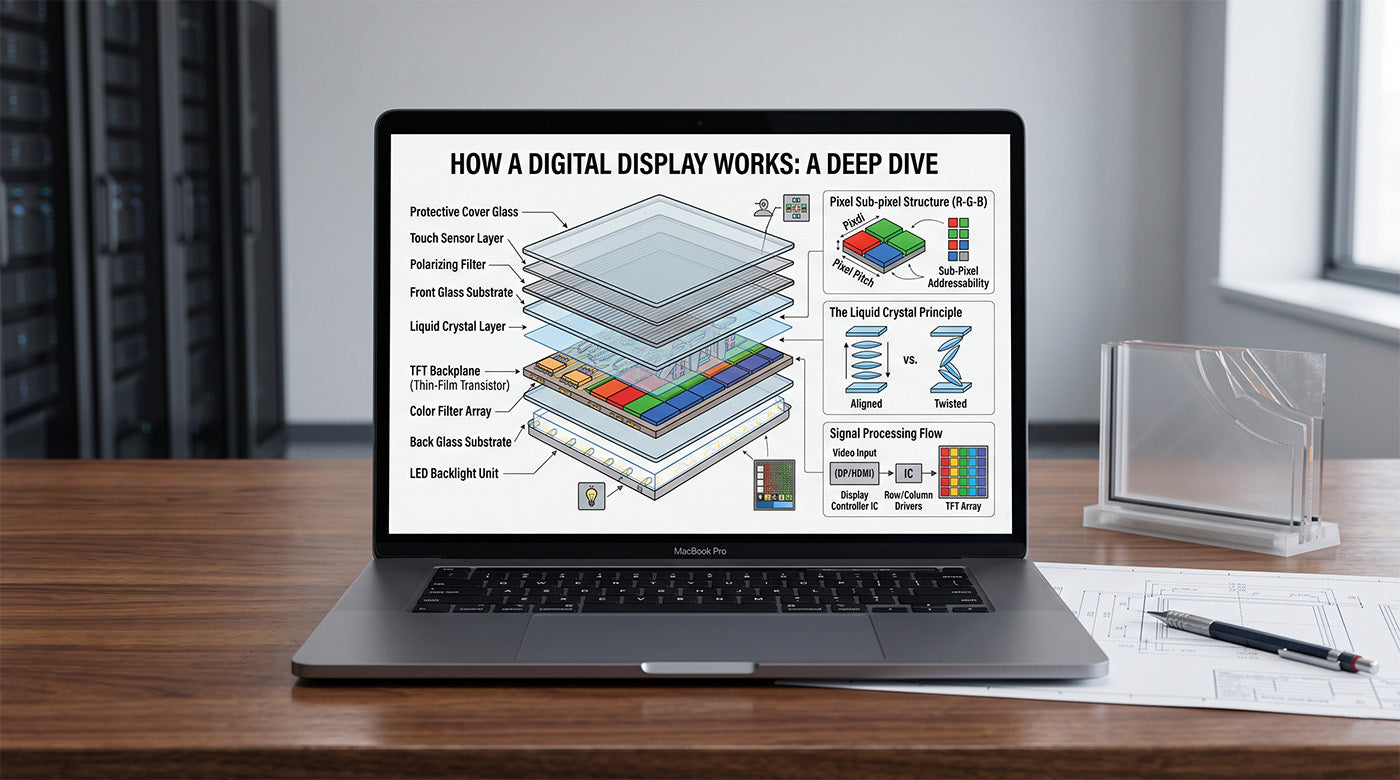
Specifying the wrong display technology for a video wall, boardroom, or command center costs time, budget, and credibility once the hardware is already on order. This guide explains how a digital display works by walking through the five-stage process that turns a video signal into the image on the wall: signal input and processing, data transmission, pixel-level image generation, module assembly, and viewer perception. By the end, you will be able to read a display spec sheet accurately, explain the difference between LED, MicroLED, LCD, and OLED technology to a client or project team, and avoid the technical mix-ups that trip up even experienced integrators. No prior electronics background is required beyond familiarity with standard AV signal chains. AWALL manufactures chip-on-board MicroLED displays for corporate, venue, and institutional installations, and this guide reflects that manufacturing background.
The At a Glance Summary
| Step Number | Phase Name | Key Action | Conceptual Complexity |
|---|---|---|---|
| 1 | Signal Input and Processing | Convert source content into display-readable data. | Low |
| 2 | Data Transmission to the Panel | Relay processed data from the sending card to each module's receiving card. | Low |
| 3 | Pixel-Level Image Generation | Drive individual LEDs or subpixels to produce brightness and color. | Moderate |
| 4 | Module Assembly and Calibration | Tile individual modules and calibrate them for color and brightness match. | Moderate |
| 5 | Refresh Rate and Viewer Perception | Redraw the image at a set refresh rate; brightness, contrast, and viewing angle shape what the viewer sees. | Low |
Step-by-Step Instructions
Step 1: Convert source content into display-readable data.
Every digital display starts with source content: a media player, streaming device, or AV control system. Follow the signal from that source to the video processor or sending card, which converts it into a data format the display hardware can interpret.
- Identify the source device driving the content (media player, control system, or streaming box).
- Locate the video processor or sending card between the source and the display.
- Common pitfall: assuming the source device communicates directly with the pixels. It does not; the processor performs the translation step first.
Step 2: Relay processed data from the sending card to each module's receiving card.
Once the signal is processed, trace how that data reaches the physical panel. The sending card transmits the processed data to receiving cards built into each individual display module or cabinet, which is how one processed signal reaches every physical section of a large display.
- Distinguish the sending card (at the processor) from the receiving cards (at each module).
- Confirm how many modules make up the full display, since each one carries its own receiving card.
- Common pitfall: treating the sending and receiving cards as the same component. They perform different jobs at different points in the signal path.
Step 3: Drive individual LEDs or subpixels to produce brightness and color.
At the pixel level, each receiving card drives individual LEDs, or red, green, and blue subpixels on a color display, to emit light at a specific brightness and color value. Self-emission microLED displays, like OLED displays, are defined by each pixel intrinsically generating light of its respective color, resulting in true black levels and high contrast because each pixel fully turns off2 when it needs to display black.
- Confirm whether the display technology is self-emissive (LED, MicroLED, OLED) or backlit (LCD).
- Note that a self-emissive pixel producing true black is what drives high native contrast ratios.
- Common pitfall: assuming every digital display uses a backlight. That applies to LCD, not to LED, MicroLED, or OLED.
Step 4: Tile individual modules and calibrate them for color and brightness match.
Large-format displays are built from many individually fabricated modules tiled together, each calibrated for color and brightness so the seams between them disappear in the final image. Manufacturers fabricate the light-emitting pixels at the micrometer scale, then assemble them onto a backplane before the modules are tiled into a complete display3.
- Check that the calibration step, not just the hardware itself, is what produces a seamless image across modules.
- Pro tip: alignment hardware affects this stage as much as calibration software. AWALL modules use an eight-magnet per-module alignment system that lets installers fine-tune seams with a magnetic adjustment tool rather than soldered or rigid bracket mounts.
- Common pitfall: assuming a large display is a single continuous panel rather than an assembly of individually calibrated modules.
Step 5: Redraw the image at a set refresh rate; brightness, contrast, and viewing angle shape what the viewer sees.
The display redraws the image many times per second, a rate known as the refresh rate. What the viewer ultimately perceives as image quality is shaped by brightness (measured in nits), contrast ratio, viewing angle, and refresh rate together, not by any single spec in isolation.
- Define nits, pixel pitch, contrast ratio, and refresh rate separately, without conflating any of them.
- Match brightness and contrast to the room's ambient light conditions rather than to the highest published number.
- Common pitfall: confusing refresh rate (how often the display redraws) with frame rate (how often the source content updates), or nits (a measure of display luminance) with lumens (a measure of total light output from a projector).
| Stage | Component | Function |
|---|---|---|
| 1. Signal Input | Video processor / sending card | Converts source content into display-readable data. |
| 2. Transmission | Receiving card (per module) | Receives processed data at each individual module. |
| 3. Pixel Generation | LED chips / subpixels | Emit light at a specific brightness and color per pixel. |
| 4. Assembly | Module cabinets and calibration software | Tile modules together and correct for color and brightness variance. |
| 5. Perception | Refresh driver, cover glass | Redraws the image at a set rate; shapes brightness, contrast, and viewing angle. |
Key Display Specifications Explained
Once you understand the five-stage pipeline, the terms on a display spec sheet describe those same stages in measurable units. Pixel pitch, brightness in nits, contrast ratio, and refresh rate are the specifications AV professionals use most often to compare display options1.
| Term | Definition | Why It Matters |
|---|---|---|
| Nits | A unit of luminance; measures brightness produced by the display itself. | Determines whether an image stays visible in bright rooms or direct light. |
| Lumens | A unit of total light output, typically used for projectors, not for direct-view LED or LCD panels. | Do not confuse with nits when comparing a projector to a direct-view display. |
| Pixel Pitch | The distance in millimeters between the centers of two adjacent pixels. | Smaller pitch supports closer viewing distances and higher apparent resolution. |
| Refresh Rate | How many times per second the display redraws the image, measured in Hz. | A higher refresh rate reduces blur and flicker, especially on video capture. |
| Frame Rate | How many times per second the source content updates, separate from the display's refresh rate. | A display can refresh faster than the source content's frame rate; the two are not the same measurement. |
| Contrast Ratio | The difference between the brightest white and darkest black the display can produce, often listed as native and dynamic figures. | Native contrast reflects real hardware performance; dynamic contrast is a processed, situational figure. |
LED, MicroLED, LCD, and OLED: How the Underlying Technologies Differ
A digital display is not a single technology. LED, MicroLED, LCD, and OLED all convert a signal into an image in slightly different ways. LED screens work well for outdoor or large-scale applications because of their high brightness, vibrant colors, strong contrast ratios, and longevity, while OLED displays are better suited to darker environments or applications where high contrast is the priority1. MicroLED extends the same self-emissive principle to a much finer pixel pitch, supporting closer viewing distances at large sizes.
| Technology | Light Source | Typical Use Case | Key Tradeoff |
|---|---|---|---|
| LCD | Backlit panel | Cost-sensitive indoor installs | Lower cost, but weaker contrast and brightness ceiling. |
| OLED | Self-emissive pixel | Premium indoor displays in controlled lighting | Excellent contrast, but less suited to bright ambient light. |
| Direct-View LED | Self-emissive pixel | Large-format, high-ambient-light, or outdoor installs | High brightness and durability, at a larger minimum pixel pitch than MicroLED. |
| MicroLED | Self-emissive pixel (micron-scale) | High-density, close-viewing commercial and institutional installs | Finer pixel pitch and long lifespan, at a higher cost per module. |
Common Points of Confusion for AV Integrators
These are the mix-ups that most often surface when explaining display technology to a client or reviewing a competing proposal. Each one traces back to one of the five stages covered above.
| Misconception | Correction |
|---|---|
| “More nits always means a better display.” | Nits measure brightness only. A display also needs accurate color and adequate contrast to look correct at that brightness. |
| “Refresh rate and frame rate are the same thing.” | Refresh rate is how often the display redraws. Frame rate is how often the source content updates. A display can refresh faster than the content's frame rate. |
| “Pixel pitch and resolution are interchangeable terms.” | Pixel pitch is the physical spacing between pixels. Resolution is the total pixel count. Two displays can share a resolution and still have very different pixel pitches and physical sizes. |
| “All digital displays use a backlight.” | LCD panels use a backlight. LED, MicroLED, and OLED pixels are self-emissive and generate their own light. |
How Does a Digital Display Work? Next Steps
You now have a working model of how a digital display converts a signal into an image, and the vocabulary to read a spec sheet or explain the technology to a client with confidence. The next step is applying that model to a specific room: matching pixel pitch to viewing distance, brightness to ambient light, and aspect ratio to the content you plan to display.
AWALL’s chip-on-board MicroLED C-Series display is designed for corporate, venue, and residential installations, selling through both a direct storefront and an authorized dealer network with published pricing starting at $19,250 for the 102" model4. Both 16:9 and 21:9 preconfigured aspect ratios are available, along with custom sizing for non-standard installations4. If you are ready to move from understanding this pipeline to specifying it for a project, contact AWALL's team to walk through pixel pitch, sizing, and aspect ratio options for your specific installation.
References
1. AVIXA. "Video Wall Solutions: What to Know Before Installation." avixa.org. Accessed July 2026. https://www.avixa.org/explore/articles/video-walls-101-what-to-know-before-installation
2. Physics Today. "Putting microLED technology on display." Vol. 77, Issue 6 (June 2024). pubs.aip.org. https://pubs.aip.org/physicstoday/article/77/6/30/3294598
3. Templier, F. "MicroLED Technology: A Unique Opportunity Toward 'More Than Displays.'" Information Display, Society for Information Display / Wiley. Published July 12, 2023. https://sid.onlinelibrary.wiley.com/doi/full/10.1002/msid.1407
4. AWALL. "AWALL CoB MicroLED Displays." awall.com. Accessed July 2026. https://awall.com/

Leave a comment
This site is protected by hCaptcha and the hCaptcha Privacy Policy and Terms of Service apply.